
 by
by 
🎫 Bank of Baroda Office Assistant (Peon) Pre Admit Card 2026 OUT – Download Now
The Bank of Baroda (BOB) has officially released the Pre Admit Card (Call Letter) for the Office Assistant (Peon) Recruitment Examination 2026 on its official website. Candidates who applied for the recruitment can now download their admit card online to appear in the preliminary online exam scheduled for 22 & 23 February 2026.
📌 BOB Office Assistant Admit Card 2026 – Key Details
| Recruitment Authority | Bank of Baroda (BOB) |
| Post Name | Office Assistant (Peon) |
| Total Vacancies | 500 Posts |
| Admit Card Status | Released Online |
| Admit Card Release Date | 15 February 2026 |
| Preliminary Exam Dates | 22 & 23 February 2026 |
| Official Website | bankofbaroda.bank.in |
⬇️ How to Download BOB Office Assistant Admit Card
| Step 1 | Visit the official Bank of Baroda website: bankofbaroda.bank.in |
| Step 2 | Go to the Careers / Current Openings section |
| Step 3 | Click on “Office Assistant (Peon) Admit Card 2026” link |
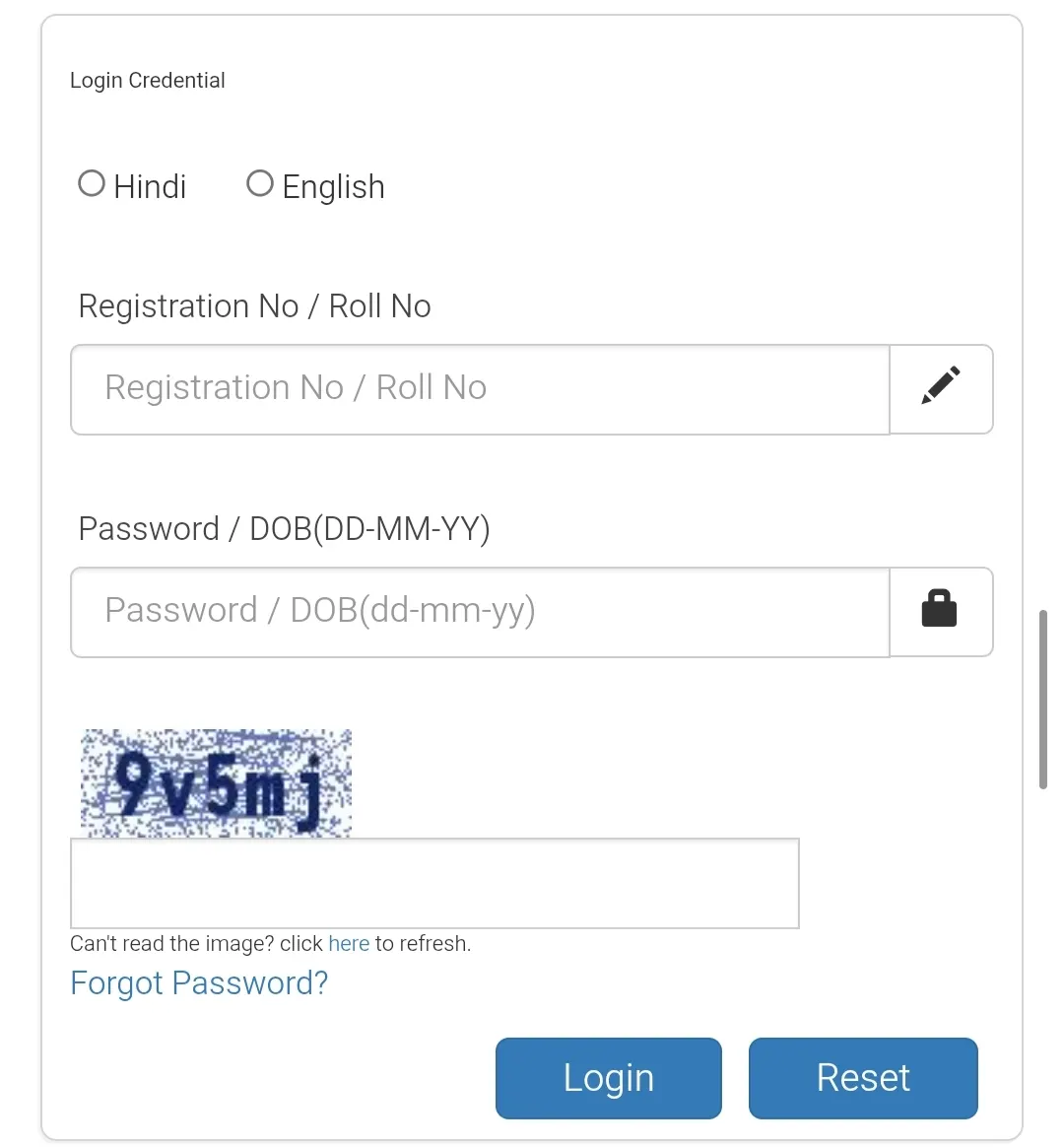
| Step 4 | Enter your Registration/Roll Number & Date of Birth/Password |
| Step 5 | Submit and download your admit card |
| Step 6 | Take multiple printouts for exam day |
📋 Details Printed on Admit Card
| Candidate Name | As per application |
| Registration/Roll Number | Printed on hall ticket |
| Exam Date & Shift | 22 & 23 Feb 2026 |
| Exam Centre Address | Venue details with code |
| Reporting Time | Mentioned on admit card |
| Photograph & Signature | Printed on admit card |
📅 Exam Pattern – Preliminary Exam
| Exam Mode | Online (Computer Based Test) |
| Total Questions | 75 |
| Total Marks | 75 |
| Duration | 60 Minutes |
| Question Type | MCQs |
| Subjects Covered | English Language, Arithmetic, Reasoning / Psychometric |
Also Check: RBI Officer Grade B & A Recruitment 2026
📄 Pre-Examination Training (PET)
The Bank of Baroda organizes Pre-Examination Training (PET) for eligible candidates before the prelims to help with exam familiarity and preparation. The PET admit card was also released on the official website, and training sessions are conducted prior to the main exam.
📅 Important Dates
| Event | Date |
|---|---|
| Notification Release | 02 May 2025 |
| Online Application Start | 03 May 2025 |
| Application Last Date | 23 May 2025 |
| Admit Card Release | 15 February 2026 |
| Prelims Exam | 22 & 23 February 2026 |
📌 Documents to Carry on Exam Day
- Printed BOB Office Assistant Admit Card 2026
- Valid Photo ID Proof (Aadhaar, Voter ID, Passport etc.)
- Passport-size photographs (same as uploaded)
- Blue/black pen for rough work
⚠️ Important Instructions
- Reach the exam centre well before reporting time.
- Carry your admit card and photo ID without fail.
- No electronic gadgets or study material allowed.
- Follow all instructions printed on the hall ticket.
🔗 Important Links
| Official BOB Website | bankofbaroda.bank.in |
| Download Admit Card | Click to Download |
📝 Note: The admit card is a mandatory document to appear for the BOB Office Assistant 2026 exam. Candidates are advised to download it early and verify all details.
❓ FAQs – Bank of Baroda Office Assistant Admit Card 2026
Q1. Has Bank of Baroda released the Office Assistant Admit Card 2026?
Yes, the Bank of Baroda Office Assistant (Peon) Admit Card 2026 has been officially released online.
Q2. What are the BOB Office Assistant Prelims Exam Dates?
The Preliminary Online Examination will be conducted on 22 & 23 February 2026.
Q3. Where can I download my BOB admit card?
Candidates can download their call letter from the official website: bankofbaroda.bank.in.
Q4. What login details are required?
You need your Registration/Roll Number and Password/Date of Birth.
Q5. Is Pre-Examination Training (PET) mandatory?
PET is conducted only for eligible candidates. It is not compulsory for all applicants.
Q6. What documents are required at the exam centre?
Carry your printed admit card, valid photo ID proof, and passport-size photographs.
Q7. Is there negative marking in the prelims?
Refer to the official notification for marking scheme details.
▶️ Also Check:
